Showing posts with label monogame. Show all posts

Tuesday, September 26, 2023

92.) MonoGame, FNA & Godot Triumph due to Unity's New Pricing Model


     MonoGame, Godot, and FNA (FNA Framework) are game development frameworks and engines that can potentially benefit from Unity's new pricing model in various ways:

1. Cost Savings
     
Unity's new pricing model, which charges developers based on the number of installations and revenue thresholds, can be quite expensive for larger game development studios or projects with a high number of installations. Monogame, Godot, and FNA are open-source or free-to-use alternatives, which can significantly reduce development costs, especially for indie developers or smaller studios.


2. No Revenue Share 
     Unity's new pricing model includes a revenue share component, where developers pay Unity a percentage of their earnings once they reach a certain revenue threshold. Monogame, Godot, and FNA do not impose revenue-sharing requirements. Developers can keep all of their earnings, which can be a significant advantage for those who want to maximize their profits.


3. Transparency
     Unity's changes in pricing structure have caused concerns about transparency and how the company tracks and defines "valid" installations. Monogame, Godot, and FNA, being open-source projects, offer transparency in how they work and do not impose hidden fees or ambiguous metrics. Developers using these engines have more control and visibility into their game's development and monetization processes.


4. Customization
     Monogame, Godot, and FNA provide more flexibility and customization options compared to Unity's more closed ecosystem. Developers can tailor their games to their specific needs without being restricted by Unity's pricing tiers or policies. This can be especially advantageous for developers with unique or complex game development requirements.


5. Community and Support
     While Unity has a large and active community, Monogame, Godot, and FNA communities are also thriving and supportive. Developers can seek assistance, share knowledge, and collaborate within these communities, often without the need for expensive Unity support services.


6. Cross-Platform Development
     All three alternatives (Monogame, Godot, and FNA) support cross-platform game development, allowing developers to target multiple platforms, including Windows, macOS, Linux, iOS, Android, and more. This versatility can be beneficial for developers looking to reach a broad audience without the constraints of Unity's pricing model.


7. Licensing
     Monogame, Godot, and FNA typically use permissive open-source licenses, which means developers have more freedom to use, modify, and distribute these engines without worrying about licensing fees or restrictions. Unity's licensing terms, on the other hand, may have limitations that affect certain types of projects or businesses.

     In summary, Monogame, Godot, and FNA can benefit from Unity's new pricing model by offering cost savings, transparency, customization, and community support. These engines provide alternatives for developers who want more control over their development process, don't want to share revenue, or seek flexibility in their game development endeavors. Ultimately, the choice between Unity and these alternatives depends on the specific needs and preferences of the individual developer or development team.


     The gaming world is buzzing! Unity's New Pricing Model Sparks Rebellion Among Game Developers with controversy as Unity, a prominent game development platform, faces a revolt from a collective of 19 companies mainly based in Europe, and primarily focused on mobile game development. These developers have come together to issue an open letter demanding that Unity reevaluate its recently announced pricing model changes. This dramatic action taken by developers, representing thousands of games with billions of downloads, includes suspending all IronSource and Unity Ads monetization in their projects until Unity reconsiders its new pricing structure.


The Unity Saga
     Unity has found itself in a heated battle with its users, and the situation is escalating rapidly. What has triggered this uprising is Unity's decision to overhaul its pricing structure, shifting towards charging developers for each installation of a Unity game after specific download and revenue thresholds are met. While Unity asserts that only a small fraction, approximately 10 percent, of its user base will be affected, the lack of clarity regarding how Unity plans to track installations and distinguish between "valid" and "invalid" ones has left developers in a state of uncertainty.


The Economic Impact
     One of the most striking aspects of this developer revolt is its economic implications. The collective action taken by these companies, which include well-known names like Voodoo.io, Azur Games, and SayGames, has essentially blocked Unity from generating any more revenue through their games. Each of these companies boasts a portfolio of over 100 games, making their decision to suspend monetization a significant financial blow to Unity. It's a powerful statement from developers who feel that their concerns are not being adequately addressed.


A Breach of Trust
     Beyond the monetary concerns, the developers are fueled by a sense of betrayal. Unity had previously established a level of transparency in its terms of service that is now perceived to be broken. This abrupt shift in pricing without clear guidelines on how it will be implemented has left many developers feeling left in the dark and questioning their trust in Unity.


Unity's Dilemma
     In the face of mounting pressure from developers, Unity finds itself at a crossroads. The company must navigate the delicate balance between revenue generation and maintaining a positive relationship with its user base. The collective action taken by these developers represents a pivotal moment in the ongoing struggle between Unity and its community. The outcome will undoubtedly shape the future of game development on the Unity platform.


     Unity's new pricing model has ignited a fierce reaction from game developers, culminating in a collective suspension of monetization in their projects. This uprising not only highlights the financial impact on Unity but also underscores the importance of transparency and trust in the developer-platform relationship. The battle between Unity and its users is far from over, and its resolution will have far-reaching implications for the gaming industry as a whole.

Tuesday, October 30, 2018

58.) MonoGame 3.7 Released!!


       MonoGame officially supports the Nintendo Switch platform in this new release along with several improvements and fixes.  If you are interested in learning how to use MonoGame, be sure to check out the links below.


Other Links


Tuesday, May 29, 2018

57.) How to Install & Run XNA on Windows 10


       Contrary to the popular belief that XNA is no longer supported on newer versions of windows (no newer than Windows 7) due to its discontinuation by Microsoft, it is possible to get XNA running on Windows 8, as well as Windows 10. In its pure form, XNA will not work as a new Windows 10 application, however there is a platform called Project Centennial which helps to bring win32 (XNA) games to Windows 10. Luckily there is an open source implementation of XNA which is essentially the exact same thing and that is currently supported on all windows versions. It’ called MonoGame and I thoroughly enjoy it. 


Pre-Requisites  

1.) You will need Visual Studio C# 2008 Express to run XNA 3.1. You can download it here 

2.) When the installation process completes, click on Exit. 

Import Note: You will need to register Microsoft Visual C# 2008 Express within 30 days by clicking on Help > Register Production. Once you provide all of the required registration information, you will be presented with a 14-character registration key. Copy and paste this key into the Registration Window and click on the Complete Registration button.

I noticed when I entered in my serial key for Microsoft Visual Studio 2008 C # Express, it didn’t work for some apparent reason. Luckily there is a solution; a way around this problem if you encounter it.

1.) First, Press your Windows Key and R together to open the Run window.
2.) Now type in “regedit” without quotes, hit enter, and navigate to: Computer\HKEY_CURRENT_USER\Software\Microsoft\VCSExpress\9.0\Registration

If typed correctly, a window named ‘Registry Editor’ should appear in just a second.


3.) Delete the value Params. 

4.) Right click on the key ‘Registration’ in the tree, and click permission. 

5.) Click Advanced… 

6.) Go to the permissions tab, and uncheck the box labeled ‘Inherit from parent the permission entries that apply to child object. Include these with entries explicitly defined here.’

7.) In the dialog that opens. Click copy


8.) Hit OK in the ‘Advanced’ window 

9.) Back in the first permission window, click your user, and uncheck Full Control. 

10.) Do the same thing for the Administrators group. 

11.) Hit OK or Apply. Congratulation, you will never again be plagued by the registration nag, and just like WinRAR, your trial will never expire. 

Important Note: I recommend restarting your computer just in case. 

If you are having trouble, check out this video below which has a similar process to the step above. The only difference is that it is less steps and has you delete the entire ‘Registration’ folder and tells you to close the Registry Editor. 


XNA 3.1 
       Now you are ready to Install XNA 3.1.

1.) Click here to download the XNA 3.1 installer. This will take you to the page where you can click on the Download option. 

2.) A file named XNAG31_setup.exe will be downloaded.

The setup wizard will guide you through the installation process.

4.) Double-click on the XNA installation program. Click on Continue if prompted for permission to continue.


5.) The Welcome to XNA Game Studio 3.1 Setup Wizard window appears. Click on Next.

6.) The Microsoft Software License Terms are displayed. Read them and then select I accept the terms in the License Agreement option and click on Next.

7.) You will be prompted to allow Game Studio and XNA games to communicate through the firewall on your computer. Click on Yes, I Wish to Select These Rules to Enable, and then enable both of the following options and click on Install.

Allow communications between an Xbox 360 and your computer on the local subnet.
Allow the communication of network games built on the XNA Framework.


8.) XNA Game Studio 3.1 will copy files to your computer and complete the installation process. Once the process is complete, a message is displayed announcing that Microsoft XNA Game Studio 3.1 was installed into Microsoft Visual C# 2008 Express. The Take Me to the XNA Creators Club Online Website option is displayed and enabled.

9.) Click on Finish. Congratulations! You now have XNA 3.1 running on Windows 10.

There are some very nice Templates that come
with XNA 3.1


Why in the world would you want to run XNA 3.1 on Windows 10? 
       I have been asked this question many times. I got my start in game development with XNA like many others. That being said, the vast majority of my game projects were created in XNA version 3.1. Prior to installing and successfully running XNA 3.1 on Windows 10, it was a hassle going back and forth between two different computers since XNA 3.1 ran on versions no later than Windows 7. Now I can keep all my projects in one place and not have to worry about whether or not they will run for the most part. There were many breaking changes between XNA 3.1 and 4.0. Now that I have figured out how to run XNA 3.1 on Windows 10, I can revive my old game projects from the dead.


       Once revived, I can convert them to XNA 4.0 also with the help of the XNA 3.1 to 4.0 Cheat Sheet. Once I get my projects running in XNA 4.0, I can then port them over to MonoGame. So I am using MonoGame to essentially port my game projects to other platforms besides the default platforms supported by XNA: Windows PC, Window Phone 7, Xbox 360 and Zune. It is also possible to create a wrapper in Unity and get your XNA game projects running in the Unity Game Engine; however it will require some work. Below is a screenshot of Dungeon Quest from the book Professional XNA Game Programming 2.0 that I converted to XNA 3.1 and successfully got running on my Windows 10 computer. I plan on converting it as well with so many other XNA 3.1 game projects to XNA 4.0 and MonoGame.

Dungeon Quest Pic 1

Dungeon Quest Pic 2


XNA 4.0 & Refresh Version
       Microsoft XNA Game Studio only supports Visual Studio 2010. Later versions of Visual Studio are only partially supported (only Windows Phone 7 projects). Here is a list of workarounds to use the Microsoft XNA Game Studio with Visual Studio 2012 and higher.

How to Setup XNA 4.0 for Windows 10 
1.) Install the Games for Windows Live Client (Mainly for Windows 8 and higher users)

2.) Install Visual Studio 2012 or higher.

3.) Install Windows Phone SDK 7.1

4.) Install Windows Phone SDK 7.1.1 Update

(Note: The Windows Phone SDK contains XNA Game Studio)

5.) Copy the folder named XNA Game Studio 4.0 from

C:\Program Files (x86)\Microsoft Visual Studio 10.0\common7\ide\extensions\Microsoft

to

  • (for VS2012) C:\Program Files (x86)\Microsoft Visual Studio 11.0\common7\ide\extensions\Microsoft
  • (for VS2013) C:\Program Files (x86)\Microsoft Visual Studio 12.0\common7\ide\extensions\Microsoft
  • (for VS2015) C:\Program Files (x86)\Microsoft Visual Studio 14.0\common7\ide\extensions\Microsoft
  • (for VS2017) C:\Program Files (x86)\Microsoft Visual Studio 16.0\common7\ide\extensions\Microsoft

On some systems Visual Studio is incorrectly installed in the Program Files (x86) folder instead of the Microsoft Visual Studio 12.0 folder. In this case you have to use this target path:

 C:\Program Files (x86)\Common7\IDE\Extensions\Microsoft

6.) Start a text editor with administrator privileges. Open the file extension.vsixmanifest from the folder XNA Game Studio 4.0. and change the supported Visual Studio version from

<VisualStudio Version="10.0">

to

  • (for VS2012) <VisualStudio Version="11.0">
  • (for VS2013) <VisualStudio Version="12.0">
  • (for VS2015) <VisualStudio Version="14.0">
  • (for VS2017) <VisualStudio Version="16.0">


This works for Visual Studio Professional. If you use an edition that is not listed, you might have to add a tag for this edition. For example, for Visual Studio 2013 Premium or Ultimate change

<SupportedProducts>
  <VisualStudio Version="10.0">
    <Edition>VSTS</Edition>
    <Edition>VSTD</Edition>
    <Edition>Pro</Edition>
    <Edition>VCSExpress</Edition>
    <Edition>VPDExpress</Edition>
  </VisualStudio>
</SupportedProducts>

to
<SupportedProducts>
  <VisualStudio Version="12.0">
    <Edition>Ultimate</Edition>
    <Edition>Premium</Edition>
    <Edition>Pro</Edition>
 </VisualStudio>
</SupportedProducts>


7.) On some PCs the following step is necessary: Clear the VS extension cache. For example, for Visual Studio 2013 delete the files in
%localappdata%\Microsoft\VisualStudio\12.0\Extensions

8.) Open the command prompt with administrator privileges. Change the working directory to the directory which contains devenv.exe:

(for VS2012) C:\Program Files (x86)\Microsoft Visual Studio 11.0\Common7\IDE\
(for VS2013) C:\Program Files (x86)\Microsoft Visual Studio 12.0\Common7\IDE\
(for VS2015) C:\Program Files (x86)\Microsoft Visual Studio 14.0\Common7\IDE\
(for VS2017) C:\Program Files (x86)\Microsoft Visual Studio 16.0\Common7\IDE\

or

C:\Program Files (x86)\Common7\IDE\

and execute 

devenv.exe /setup

to rebuild the extension cache. 


Known Issues: Content is always rebuilt
       In some solutions XNA content projects are always rebuilt even if the output is up-to-date - which can be annoying because building content can take many minutes in larger projects. Usually, this happens if a content pipeline project is included in the solution. The content pipeline assembly is updated every time the project is built, which causes the content to be rebuilt. A simple workaround is to build the content pipeline projects once and then unload it from the Visual Studio solution: In Visual Studio open the Solution Explorer, right-click the content pipeline project and select Unload Project in the context menu.

       If this does not solve the problem and the content is still rebuilding, then you can check the Visual Studio build log in the Output window to see which project causes the rebuilds. You might have to increase the amount of information in the build log: Open the menu Tools | Options... | Projects and Solutions | Build and Run and change the MSBuild project build output verbosity to Detailed.


XNA Installers
       If you have any trouble with finding the installation files on the web to download and install XNA, I have also provided them below:


Along with XNA installation files, this download also contains the following if you had any trouble above: 

Games for Windows Live Client
Windows Live Sign-In 
Windows Phone SDK 7.1


Important Note: Its not required but if you'd like, this guide created by Roy Triesscheijn that will provide you with a workaround for using XNA in Visual Studio 2017


MonoGame
       Like myself, there are lots of programmers still bitter about Microsoft's decision to shutdown XNA on PC and Xbox. If you have XNA projects and assets, the good news is they they can be transferred over to MonoGame which is a good stand in. Both Xbox One and Windows 10 support MonoGame. Check out the 2015 Build Conference video by Jaime Rodriguez and Brian Peek.  On March 14, 2016, ID@Xbox announced that MonoGame is coming to Xbox One. This was great news for XNA fans.


How to Setup MonoGame
       RB Whitaker's Wiki provides some awesome tutorials both for XNA and MonoGame. Go to the Setting Up MonoGame page to learn how to successfully install MonoGame. Check out this awesome video below by Chad Carter on upgrading XNA 3.1 to XNA 4.0 / MonoGame 3.5.1 / Universal Windows Platform.


Sources:
Stackoverflow: How to install XNA Game Studio on Visual Studio 2012: https://stackoverflow.com/questions/10881005/how-to-install-xna-game-studio-on-visual-studio-2012 


Justin Aquadro: XNA Templates for Visual Stuidio 2013: https://jaquadro.com/2014/02/xna-templates-for-visual-studio-2013/ 

Roy T.: Installing XNA 4 under Visual Studio 2017: https://roy-t.nl/2017/07/18/Installing-XNA-4-under-Visual-Studio-2017.html  


Monday, May 28, 2018

55.) XNA Developer's Survival Kit Expanded


Is it possible to created a game engine like Unity or Unreal in XNA/ MonoGame? How long would it take to create?

       In short, the answers is yes, however the vast majority will say given enough talent, number of coders, time and money. These are all variables that will have a major impact on the time-frame it would take to create an engine "like or equivalent to Unreal or Unity". There are other variables and factors that could also pro-long the development of such an engine as life can get in the way. There are tons of research on the web that says it could take 5 years or more. With the help of this awesome developer's survival kit, you will be able to create an epic game engine in a fraction of both that time and costs.

       If you are thinking about creating your own game engine and you utilize XNA and or MonoGame, I highly recommend the XDSK2 Expanded (XNA Developer's Survival Kit Expanded). This page contains a list of links to tools that can be used by game developers to develop their own games or game engines, without having to spend weeks and weeks searching over the internet for specific libraries, algorithms and other resources needed to develop a game. There are a host of third party libraries as well. One of the advantages of using a platform like XNA or MonoGame is that there is a large enough developer community providing lots of libraries out there to help you do cool and unique things with it. That way you can leverage these libraries to solve your technical problems, and focus more on making your game fun.

       This kit was originally created by Nelson Hurst who has re-uploaded the original XDSK2 on his blog. So this page is essentially a combination of Nexlon's research and mine. If you are looking for tools to help you save time and money with your game projects, even if you don't use XNA or MonoGame, you will still find this page very helpful!  I will gradually continue to update the XDSK2 Expanded page and add more as I discover them over time. If you have any additional libraries and or resources to help ease the burden of creating games and or game engines in XNA and MonoGame, please share them by commenting below. In this blog post, I also present several libraries that you may find useful.


PHYSICS
       One of the most difficult parts of a modern game is the physics engine. Even more than graphics, this is one of the advantages of having a 2D game, since 2D physics is simpler than 3D physics. It also means that there are likely to be a lot of free physics libraries out there (unlike the 3D engines, which want some serious money). My preferred 2D physics engine is called Farseer Physics.

Farseer Physics
       Created by Jeff Weber and lead by Ian Qvist, the Farseer Physics Engine (now changed to Velcro Physics) is an open source high performance 2D collision detection system with realistic physics responses. It was originally based off the XNA port of Box2D. This download includes source code, samples and documentation. It also includes the source to Velcro Physics. Check out the samples inside the Projects folder. The Simple Samples projects were created by Mads Laumann. The TestBed project was ported by Marcel Härte to MonoGame 3.6. Also, check out the Black Hole Gunner game located in the projects folder. Black Hole Gunner was a game created by Libor Vilimek, Jan Å vehla, and VojtÄ›ch Ruschka. The game was made at the end of year 2010 at Czech Technical University (ÄŒVUT) in school subject "Computer games and Animations". The game is based on the Farseer Engine, built in XNA 4.0, Visual Studio. Black Hole Gunner was made within 2-5 months with no game-experience creation.

Farseer has a ton of features!

  • Continuous collision detection (with time of impact solver)
  • Contact callbacks: begin, end, pre-solve, post-solve
  • Convex and concave polygons and circles.
  • Multiple shapes per body
  • Dynamic tree and quad tree broadphase
  • Fast broadphase AABB queries and raycasts
  • Collision groups and categories
  • Sleep management
  • Friction and restitution
  • Stable stacking with a linear-time solver
  • Revolute, prismatic, distance, pulley, gear, mouse joint, and other joint types
  • Joint limits and joint motors
  • Controllers (gravity, force generators)
  • Tools to decompose concave polygons, find convex hulls and boolean operations
  • Factories to simplify the creation of bodies


Sunday, October 8, 2017

52. XNA 4.0 & MonoGame Robot Mech Attachments


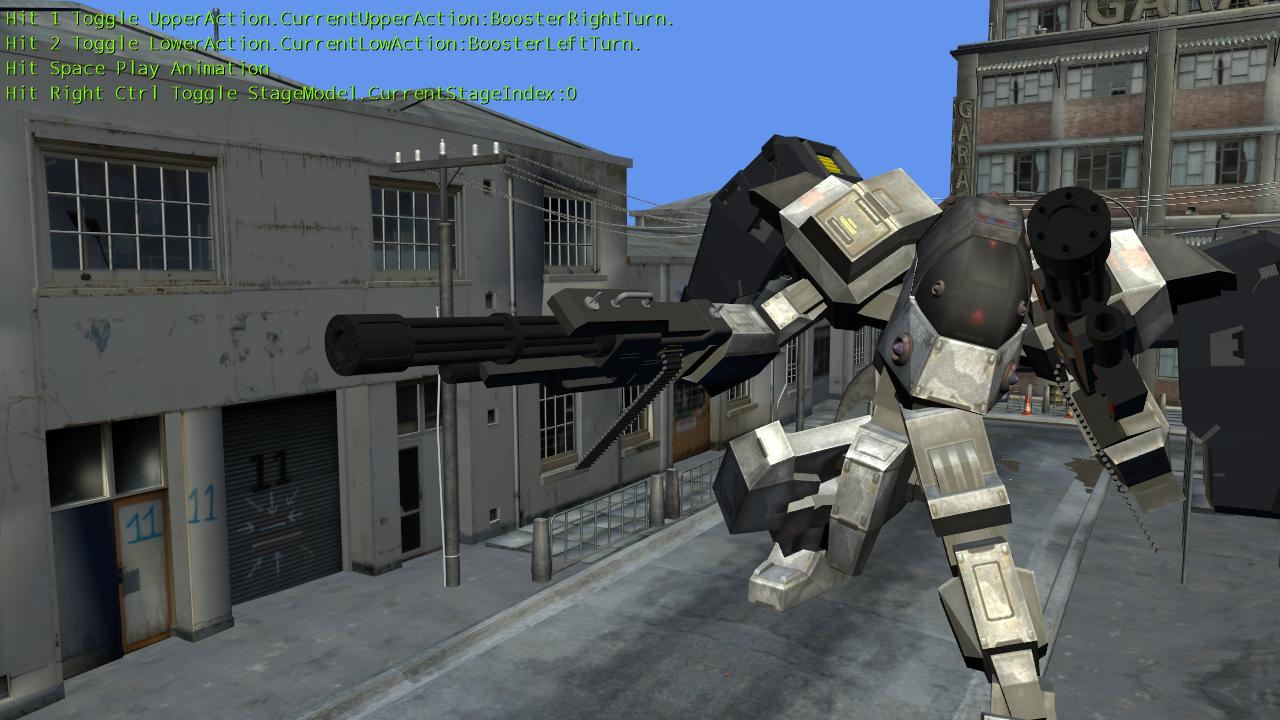
       The is my robot animation processor based off the Robot Game Starter Kit running in XNA 4.0 and MonoGame. It took a while to figure out how to attach models to the mech "correctly". By multiplying the bone-transform of the specific bone index of the mech, to the parent-bone index of the model, I was able to attach them. This works for both animated and non-animated models. Figuring out how to attach the models to the mech was the first challenge. However, due to the complexity of the animation processor, positioning the models correctly on the mech model was the biggest challenge. Now that attachments work, I am programming customization options for the mech.


Jet-Pack Screenshots


Gun Screenshots


       Besides guns, I was able to attach melee weapons to the mech such as swords. I will be working on a way to program the mech's animation processor to somehow mimic the animations of other animated characters. This will help save time when creating melee animations for sword attacks and blocks. Performing melee sword attacks also while jet-packing could make for some interesting gameplay. 


Dual-Wielding Swords Screenshots


The Map in First-Person


My FPS Engine Project Template (Left)
&
Call of Duty Modern Warfare 2 (Right)


Tuesday, September 12, 2017

50. Character Armor Customization Part 2


       For this next armor customization update, I created a custom armor set inspired off of Link from the Legend of Zelda games and my personal favorite superhero... Iron Man! Due to the vast amount of customize-able options, creating all the art assets for players to choose from has been the most time consuming. I will explain how it works in further detail. From the menu, the player will be able to adjust the load-outs of their character. For the long-term project, new gear will become available when the player completes various missions or when goals are met. Players will start off with a basic armor set. Then they will be able to change different parts of their armor. The following options so far are: helmets, left shoulder, right shoulder, chest pieces, arms, gauntlets, legs, thighs, and backpacks.

       I might add the option to change knee guards and torso parts. I am also working on a way where players can add neon lighting for special effects. There are different types of categories for backpacks. There are jet-packs, capes and wings. They not only help with agility and speed, but jet-packs for instance will allow players to hover while jumping for a certain amount of time. The following pictures will fall under the category of Armor Presets in which players will have the option to purchase. Presets are pre-made armor sets inspired off of characters from a variety of sources such as games and movies  once I obtain certain rights. The armor sets for the most part take the same amount of damage, so they are purely cosmetic. This eliminates the issue of players having advantages over other players and the so called "pay-to-win" model. After all, playing "dress-up" with your character is fun.


LINK


IRON MAN 

Front View


Back View


Top View


In-game screenshot


Master Chief
       The following screenshots below are of the Master Chief's armor attached to the character marine model inspired from the model by 343 Industries from the game Halo 4. This is not the actual Master Chief model and its purely for fan-art out of my curiosity. The following screenshots are a work-in-progress and for non-profit just to be clear. This will not be in the actual game of-course so no copyright infringement. These armor load-out screenshots was taken from my phone and are running in-engine.